
Viking Voyager
Viking CruisesTravel & Local
4.6841.00 Reviews
- Version
- v1.40.6
- Installs
- 100.00K
- Age Rating
- Everyone
Screenshots

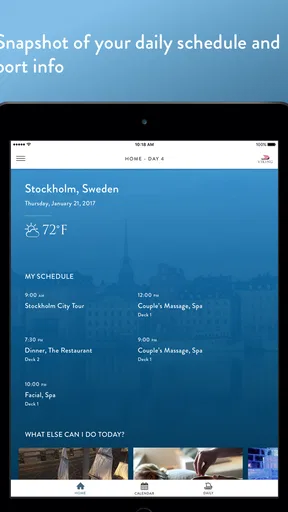
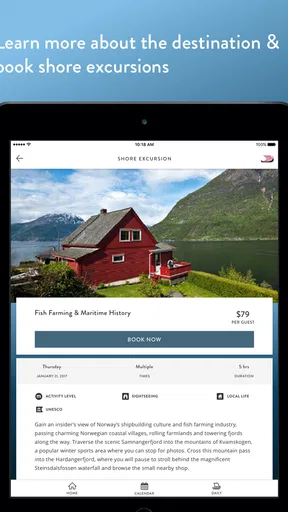
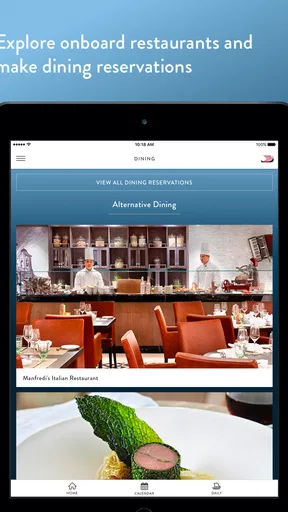
Our Review of Viking Voyager
 Analysis by Appyee
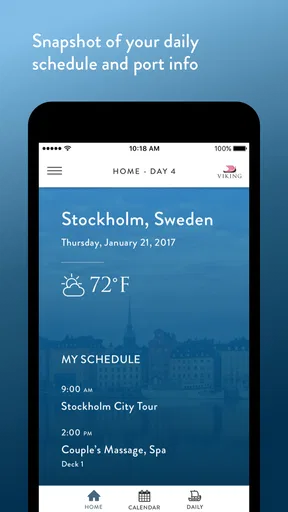
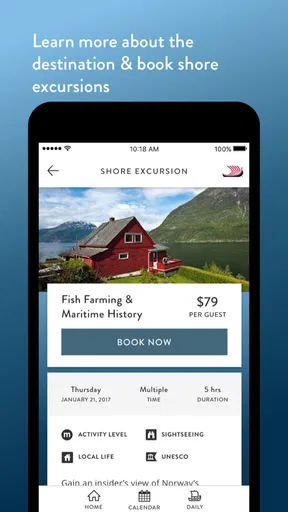
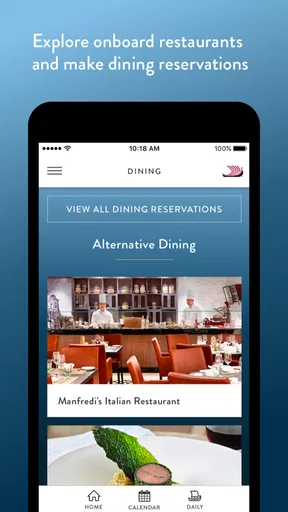
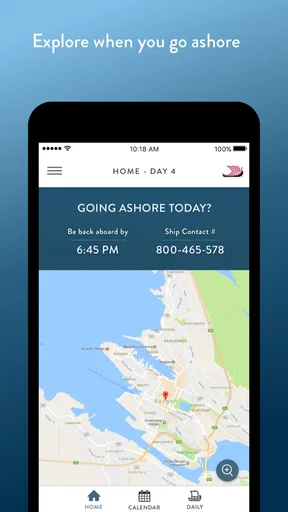
Viking Voyager is the kind of travel app I would install before boarding a Viking ship, then judge by how much it reduces the need to search through emails, printed documents, or conversations with staff. Developed by Viking Cruises, it is a free Travel & Local app for Viking Ocean, River, and Expedition journeys. My overall impression is positive: it is most useful as a trip companion that brings voyage information into one place, but its value depends heavily on having a working connection when you need it.
The app has been available since June 26, 2017, and its current release is v1.40.6. It is suitable for Everyone and runs on Android 7.0 or later. With an average rating of 4.6 from around 2.4 thousand ratings, it has clearly become a familiar tool for many Viking travelers. I would not treat that rating as a promise that every trip will feel effortless, though. Travel apps are judged in stressful moments, and a small connectivity problem can matter more on a ship than it would at home.
What the app adds to a Viking journey
The main appeal is concentration. Instead of moving between a browser, an inbox, a calendar, and paper travel documents, I can use one Viking-focused app as part of my onboard routine. That matters particularly on a cruise or river itinerary where the day can change from a quiet morning onboard to an excursion, a meal, and a return-time decision within a few hours.
I see the app as a companion to the trip rather than a replacement for every other travel tool. Maps, airline apps, weather services, translation tools, and messaging apps still have their roles. Viking Voyager is more specialized: it is intended to enhance the onboard experience on Viking Ocean, River, and Expedition ships. That specialization is its strength, because a general travel organizer cannot know the context of a Viking sailing in the same way.
For a first-time Viking passenger, the useful mental model is not “another booking app.” It is closer to a voyage workspace. I would open it before leaving home to become familiar with the trip, check it during the journey when planning the next part of the day, and use it alongside the ship’s normal communication channels when something important changes.
Where connectivity becomes part of the experience
The most important practical question is not simply whether the app is installed. It is whether the phone can reach the information the app needs at the moment I open it. On a ship, connectivity can feel different from a normal city trip. A device may show a Wi-Fi connection while a particular service is slow, a cellular signal may disappear, or a connection may be available in one area and unreliable in another.
That makes timing important. I would check voyage information before leaving a reliable connection, especially when preparing for an excursion or a scheduled activity. If I know I will be away from the ship for several hours, I would also make sure I have read the relevant details rather than assuming I can load everything later. This is not a claim that every part of the app works without a connection; it is simply a sensible habit for any travel service whose information may be network-dependent.
A realistic example is an excursion morning. I might wake up, connect successfully, review what I need to know, and then leave the ship with my phone in a pocket. If I wait until I am standing in a busy port to open the app for the first time, I am creating unnecessary risk. I prefer to prepare while the connection is dependable, then use the app during the day when access is available.
The same principle applies when returning onboard. Rather than relying on a last-minute refresh while moving through a crowded terminal, I would look at the day’s details earlier and keep the practical information in mind. Viking Voyager can reduce uncertainty, but it cannot remove the physical and technical realities of traveling between ship, shore, and changing networks.
Using it in different mobile situations
On a large ocean ship, I would expect to use the app while walking between areas, waiting for a meal, or preparing for an organized activity. That is more convenient than finding a desk, opening a laptop, and sorting through a long message thread. A phone is already the device most people carry, so the format makes sense for quick checks.
River travel creates a different rhythm. The scenery and towns change more frequently, and a traveler may be thinking about the next stop while moving through a compact ship. In that setting, a focused app can be easier than a general itinerary document because I am less likely to lose the relevant information among unrelated reservations and travel emails.
Expedition travel adds another layer of uncertainty. Conditions, schedules, and daily plans can feel more fluid than a standard city break. I would use Viking Voyager as one source of current voyage information, but I would still pay attention to announcements and instructions from the crew. A mobile screen should support good travel habits, not replace listening when staff are explaining a change or a safety matter.
There is also a social benefit. If I am traveling with someone who prefers not to manage every detail digitally, I can check information on my phone and explain the plan without asking them to install or learn several different services. On the other hand, if everyone in a group is using the app independently, we should avoid assuming that each person has seen the same update. For an important meeting time or departure instruction, I would confirm it together.
Small workflows that make it more useful
My first tip is to open the app before the journey becomes busy. I would sign in or complete any setup while at home, when I have time to solve a password or account issue without pressure. This is a better workflow than treating installation as something to do while boarding or walking through a port.
My second tip is to use a short review cycle. Instead of repeatedly checking the app without a purpose, I would look at it once in the morning, again before leaving the ship, and once more when planning the next part of the day. That keeps the app useful without turning the phone into a constant distraction from the trip.
My third tip is to distinguish information that is convenient from information that is critical. For convenient details, a delayed refresh is frustrating but manageable. For anything involving where I need to be or when I need to return, I would read it early, verify it against onboard announcements, and avoid depending on a single screen at the last possible moment.
A fourth useful habit is to keep the phone ready for travel rather than entertainment alone. A charged battery, sensible screen brightness, and enough free storage for normal app operation are basic steps, but they matter when the app is being used while walking around a port. These are not special Viking Voyager features; they are practical ways to prevent a phone-based travel plan from failing for avoidable reasons.
When the connection fails
The frustrating moment is easy to imagine: I tap the app just as I need a detail, and the page takes too long to appear. My response would be to avoid repeatedly tapping and immediately blaming the app. First I would check whether the phone is actually connected, move to a different location if appropriate, and try again after a short pause. On a ship, the problem may be the network rather than the application itself.
If the app still does not respond, I would switch to the information already available on the phone, in my travel documents, or through the ship’s staff. That is why I would review the day’s plan in advance instead of making the app my only source of essential information. A good travel workflow has a fallback, especially when the journey involves water, ports, and changing coverage.
Recovery after a failed connection should also be deliberate. Once access returns, I would reopen the app and check whether anything has changed rather than assuming the earlier screen is still current. This is particularly important if the interruption happened around a planned activity or shore visit. The app can help me catch up, but only if I remember to refresh my understanding after the network problem ends.
I would also keep the app updated when a reliable connection is available. The current version is v1.40.6, and using the current release is generally sensible for compatibility and stability. I would not wait until boarding day to discover that an update, login step, or device issue needs attention. Preparing at home gives me a much calmer way to recover from problems.
Using the app without wasting mobile data
Travelers often think about data only when a bill arrives, but network use can also affect speed and battery. I would avoid repeatedly reopening the same screens just to see whether something has changed. A few purposeful checks are more sensible than leaving the app active throughout the day.
When I have access to a dependable connection, I would review the information I expect to need soon. I would also avoid assuming that a successful connection once means every later request will work. The practical balance is to prepare early, check again when an update is genuinely important, and use staff or other travel documents when the app is slow.
This approach is especially useful for travelers who use a limited mobile plan or are concerned about roaming. Viking Voyager is free to download, but “free” does not mean that every network used to access it is free. The cost of connectivity depends on the traveler’s phone plan and circumstances, so I would check those arrangements before sailing rather than making assumptions.
Battery deserves the same attention. A phone used for the app, photos, maps, messages, and boarding information can lose power faster than expected. I would not keep the display awake unnecessarily, and I would carry a charging solution that fits my travel plans. If the phone is also my camera and payment device, preserving battery is more important than constantly monitoring the app.
How it compares with ordinary travel tools
A general itinerary app is often better for combining flights, hotels, restaurant bookings, and independent sightseeing. If my trip includes several unrelated providers, I would still want that broader overview. Email is also valuable because it preserves confirmations from airlines, hotels, and excursion companies outside the Viking environment.
Viking Voyager has a different advantage: it is centered on the Viking journey. That can make it less cluttered for onboard use than a general organizer filled with unrelated reservations. I would choose it when I want a voyage-specific reference, not when I need one universal dashboard for an entire multi-company vacation.
Printed documents remain useful in a narrow but important way. Paper does not need a signal or battery, and it can be handed to another traveler. Its weakness is that it may not reflect a later change as conveniently as a digital service. My preferred approach is not app versus paper; it is app for current convenience, with essential travel details understood or retained through a sensible backup.
For travelers who dislike phone-based planning, the app may feel unnecessary. If I am comfortable asking crew members for help and prefer to keep my phone away during the voyage, I may gain little from using it frequently. The strongest case is for people who like checking details independently and want a digital companion that stays close at hand.
Who should install it, and who can skip it
I would recommend installing Viking Voyager to anyone taking a Viking Ocean, River, or Expedition trip who wants a convenient way to engage with the onboard experience. It is particularly suitable for travelers who organize their day from a phone, prefer self-service information, or want to reduce the amount of paper and email searching involved in a voyage.
It is also a sensible choice for a group leader. One person can become familiar with the day’s information and help coordinate a family or travel party. That does not mean the app should replace direct confirmation for important instructions, but it can make ordinary coordination less awkward.
I would be less enthusiastic for someone whose phone is old, whose connection arrangements are uncertain, or who strongly prefers offline planning. The minimum operating system is Android 7.0 or later, so device compatibility should be checked before relying on it. iPhone and Android travelers should also prepare their account and device before the sailing rather than assuming setup will be effortless onboard.
The age rating of Everyone makes the app broadly approachable, including mixed-age travel groups. Still, ease of access is not the same as universal usefulness. A traveler who only wants a printed schedule may reasonably skip it, while a traveler who wants quick digital access will probably find the installation worthwhile.
The practical verdict on connectivity
After considering how I would actually use it, I see Viking Voyager as a helpful voyage companion with one clear condition: I need to use it intelligently around connectivity. Its best moments are the quick checks before an activity, the ability to keep voyage-related information close, and the reduced need to search through unrelated travel material.
Its main friction is not that a phone app is inherently inconvenient. It is that ship travel makes reliable access less predictable than an ordinary day at home. I would prepare while connected, avoid treating the app as my only backup, and verify important changes through the crew or other available information.
Viking Cruises has made the app free, and its established presence, 100K-plus installs, and 4.6 average suggest that many travelers find a reason to keep using it. Those figures are encouraging, but my recommendation is based more on fit than popularity. If you are sailing with Viking and like having trip information on your phone, I would install Viking Voyager before departure and make it part of a broader travel routine.
My final view is straightforward: use it as a prepared, connectivity-aware companion, not as your only lifeline. That mindset gives the app room to be genuinely convenient while respecting the realities of ship networks, battery life, roaming, and changing travel plans. For the right Viking passenger, that is a worthwhile balance.
Verdict
Strengths of Viking Voyager
- Easy-to-learn controls make the game accessible to casual players.
- Viking-themed visuals create a distinctive and entertaining atmosphere.
- Short gameplay sessions suit quick breaks and mobile play.
- Progression gives players goals beyond simply completing each level.
- Runs smoothly on many modern Android and iOS devices.
Limitations of Viking Voyager
- Some levels may feel repetitive after extended play sessions.
- Later challenges can become noticeably more difficult without upgrades.
- In-app purchases may speed up progress for impatient players.
- The game may require an internet connection for certain features.
- Limited customization can make long-term gameplay feel less personal.
Similar Picks in This Category
View All
Google Maps
Google LLC3.4

Google Maps Go
Google LLC4.1

Booking.com: Hotels & Travel
Booking.com Hotels & Vacation Rentals4.8

Google Earth
Google LLC3.8

Skyscanner Flights Hotels Cars
Skyscanner Ltd4.8

trivago: Compare hotel prices
trivago N.V.4.4
Frequently Asked Questions
What is Viking Voyager, and what kind of experience does it offer?
Viking Voyager is an adventure-focused game centered on Viking exploration, travel, and discovery. Players typically guide a Viking character or crew through different environments, complete objectives, overcome hazards, and collect useful resources. The game combines exploration with light action and progression mechanics, making it suitable for users who enjoy Nordic themes, short challenges, and a journey-based experience rather than a purely competitive multiplayer title.
Is Viking Voyager free to download and play?
Viking Voyager can generally be downloaded without an upfront purchase, but availability of optional in-app purchases may depend on the version and platform. These purchases can sometimes provide extra resources, cosmetic items, progression benefits, or other conveniences. Before installing, users should check the app-store listing for the current pricing details, advertisements, supported payment methods, and whether any features are restricted behind purchases.
Does Viking Voyager require an internet connection?
The connection requirements may vary according to the version installed and the feature being used. Basic gameplay may be available offline in some situations, while advertisements, cloud saves, updates, leaderboards, rewards, or other online functions can require an active internet connection. If you plan to play while traveling, it is worth testing the game after installation with Wi-Fi and mobile data disabled.
Is Viking Voyager suitable for children?
Viking Voyager may be appropriate for younger players, but parents should review the official age rating and content description before downloading it. The game can include cartoon-style combat, perilous situations, advertisements, or optional purchases, depending on the platform version. Parents should also consider enabling purchase restrictions and checking the privacy policy, especially if children will use the app on a shared Android or iOS device.
What devices are compatible with Viking Voyager, and how much storage is needed?
Compatibility depends on the specific Android or iOS release, operating-system requirements, and the developer’s latest updates. Older phones or tablets may experience slower loading, reduced performance, or installation limits even when the app appears in the store. Users should confirm the minimum operating-system version, available storage, and permissions shown on the official download page, while keeping additional space free for updates and temporary game files.
